1. The Vision: Moving Beyond the Chatbox
For the past three years, the tech industry has largely confined Generative AI to a text-box prompt in a browser tab. While large language models are undeniably brilliant at reasoning, summarizing, and writing code, typing questions into a web interface always felt like a pale imitation of what science fiction promised us.
I wanted something fundamentally different: a genuine J.A.R.V.I.S.
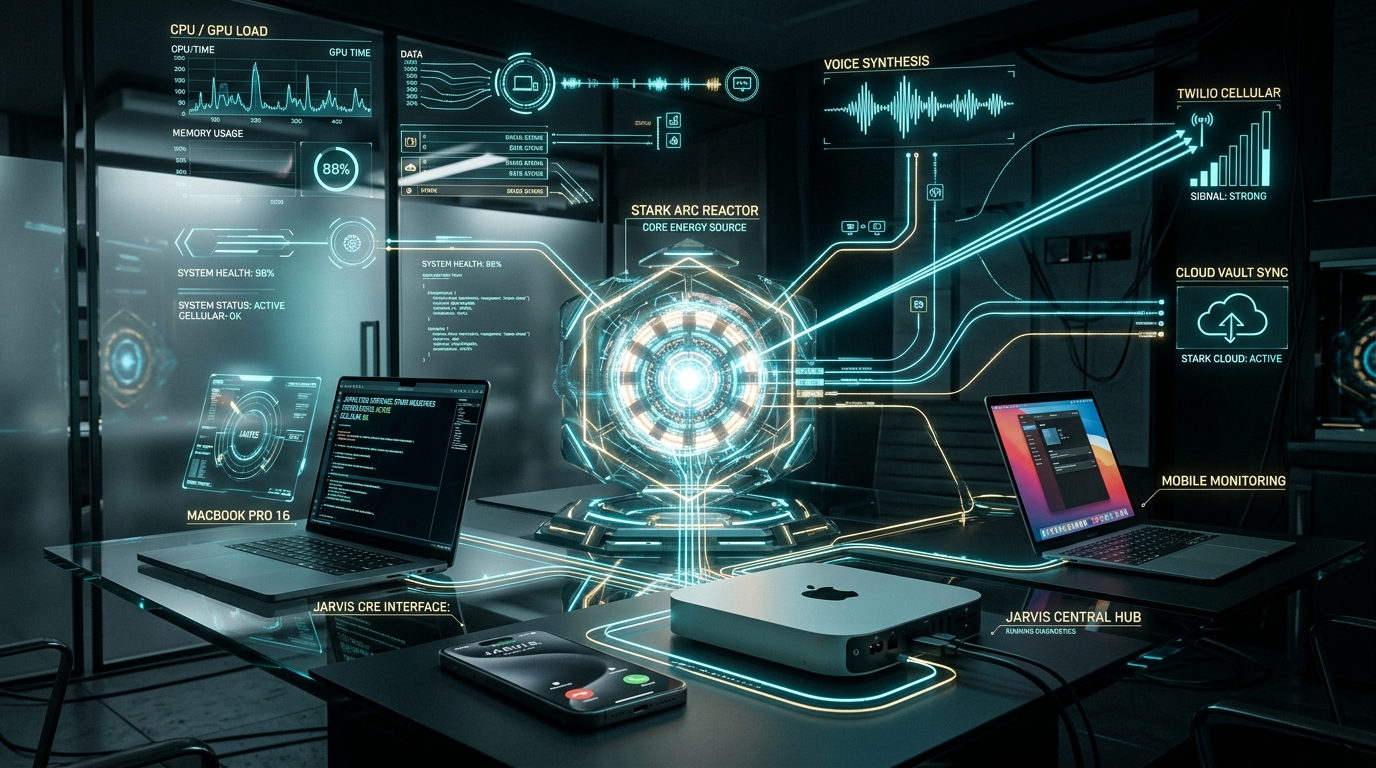
Not a chatbot, but an ambient, autonomous system that lives on my machines, monitors hardware telemetry across my multi-Mac fleet (my Mac mini server, MacBook Pro 16, and MacBook Air), speaks in Paul Bettany’s unflappably polite British cadence, controls physical macOS applications, and most importantly: has the autonomous capability to dial my mobile phone directly when critical events require my attention.
Using Google Antigravity—Google DeepMind's advanced agentic AI platform—we engineered, compiled, and deployed this entire production system in a single afternoon.
What Makes an Assistant "Authentic JARVIS"?
A true JARVIS requires four pillars working in unison: Ambient Presence (system-wide hotkey and HUD), System Agency (direct execution via terminal, AppleScript, and process governance), Sub-Second British Voice Synthesis, and Cellular Reachability (the power to dial out to the physical world).
2. The Multi-Mac Mesh Architecture
Running an AI assistant on a laptop is fine until you close the lid. To build a system that never sleeps, the architecture is distributed into a Hub-and-Spoke Mesh:
- Central Core (Tom's Mac mini): The always-on command hub connected to continuous power and high-speed LAN. It hosts the
jarvis_daemonHTTP/IPC engine on port8765, coordinates persistent memory in SQLite/JSON, monitors peer heartbeats, and handles outbound telephony. - Workstation Client (MacBook Pro 16 M4 Pro): The heavy engineering workstation where interactive queries, deep code audits, and incident command workflows originate.
- Mobile Client (MacBook Air): The travel laptop, connected back to the Mac mini hub via our local SSH mesh and Google Cloud Storage vault.
Swift Cocoa HUD (JARVIS.app) with custom vector Arc Reactor menu bar icon and Cmd+Shift+J global summon.
Neural British speech (en-GB-RyanNeural / ElevenLabs) with procedural 44.1kHz Stark UI sound effects.
Twilio Voice API integration with TwiML audio streaming, Polly.Brian voice synthesis, and cellular SMS fallback.
3. Cinematic Audio & The Native Stark HUD
Most voice assistants sound robotic or overly cheery. In the Marvel Cinematic Universe, JARVIS has a distinctive calm, aristocratic wit delivered with impeccable timing.
We engineered the voice engine with three tiers:
- Edge-TTS Neural British (
en-GB-RyanNeural): Fast, zero-latency, natural British cadence with subtle inflection. Zero API cost and runs completely unmetered. - ElevenLabs Voice Clone: Supports a cloned Paul Bettany acoustic model for movie-identical resonance.
- Offline Apple Daniel: Local fallback using macOS's built-in UK English voice engine for total offline resilience.
To complete the experience, we procedurally generated 44.1kHz audio cues directly using Python math envelopes—creating the iconic high-tech chime when JARVIS awakens and harmonious confirmation tones when a command concludes.
On the frontend, JARVIS.app is a lightweight native Cocoa application written in Swift. It sits unobtrusively in the menu bar as a dynamic Arc Reactor icon. Pressing Cmd + Shift + J floats a dark, translucent frosted-glass HUD with rotating cyan and gold reactor coils that pulse dynamically as JARVIS speaks.
4. The Breakthrough: Connecting JARVIS to Call My Cell Phone
The most transformational leap was giving JARVIS a physical cellular voice. Why be tethered to a desk when your AI assistant can pick up the phone and ring you wherever you are?
We integrated the Twilio Voice REST API directly into the phone_caller.py subsystem. When triggered, the Mac mini contacts Twilio's telephony infrastructure, establishes a cellular call to my mobile device, and streams dynamic TwiML instructions:
<Response>
<Pause length="1"/>
<Say voice="Polly.Brian" language="en-GB">
Good morning, Mr. Huseby. JARVIS calling with your operational briefing.
Cloud incident queues are clear, and your 9:00 AM architecture review is confirmed.
</Say>
<Pause length="1"/>
<Say voice="Polly.Brian" language="en-GB">JARVIS out, sir.</Say>
<Hangup/>
</Response>
By pairing Twilio's global telephone network with Amazon Polly's Brian British voice, JARVIS sounds impeccably crisp over standard cellular audio codecs.
5. High-Value Real-World Use Cases
What does an autonomous talking computer actually do once it has cellular calling and deep system access? In my daily routine and professional work as Head of Global Incident & Escalation Management at Google Cloud, here are the primary use cases:
1. The Executive Morning Briefing
Instead of an annoying alarm buzzer, JARVIS dials my cell phone at a designated hour. When I answer, he delivers a concise audio briefing: Austin weather, traffic conditions, early calendar conflicts, and a status check on our workstation fleet.
2. High-Severity Incident & Outage Escalations
In cloud operations, push notifications and Slack pings are easily lost in the noise when you are away from your desk. When our monitoring detects critical thresholds breaking, JARVIS rings my cell phone directly:
"Pardon the interruption, Mr. Huseby. We have a priority incident alert on the European cluster. Latency has breached 450 milliseconds. I have already staged the diagnostic telemetry on your workstation."
3. Remote Hands-Free Workstation Commands
If I step away from my home office and forget to lock my workstation, I can trigger a command remotely via SMS or voice: "JARVIS, lock my workstation and put displays to sleep." JARVIS executes the AppleScript immediately on the Mac mini, locks all monitors, and texts back confirmation.
4. Cross-Fleet Health Monitoring & Self-Healing
Because JARVIS continuously polls the MacBook Pro and MacBook Air via SSH, he acts as an automated fleet manager. If disk space drops below 10%, if a backup sync fails, or if a rogue process spikes CPU load for more than 15 minutes, JARVIS notifies me before it impacts productivity.
6. Why Google Antigravity Was the Secret Weapon
A project of this scope would typically require a multi-week engineering sprint across multiple specialized disciplines: Swift AppKit GUI development, Python network programming, audio DSP synthesis, Twilio telephony webhooks, and distributed deployment scripts.
With Google Antigravity, we accomplished this in hours. Antigravity provided:
- Autonomous Multi-File Planning: Reasoning about the entire system architecture (HUD, background daemon, audio pipeline, deployment scripts) before executing a single line of code.
- Native macOS Systems Programming: Seamlessly compiling Swift with
swiftc -O, configuringInfo.plistsandboxing and microphone entitlements, and packaging native.appbundles. - Zero Context Switching: Antigravity synthesized the procedural WAV audio files, verified the Python virtual environment dependencies, tested local HTTP sockets, and deployed the binary to peer Macs over SSH in real time.
Conclusion: The Future of Personal Computing
We are standing at the threshold of a major inflection point in human-computer interaction. The era of static apps, file hierarchies, and typing into isolated chat windows is giving way to ambient, agentic operating partners.
JARVIS is no longer a movie fantasy. By combining Google Antigravity’s reasoning engine, macOS's native system automation, and modern cellular telephony, your computer can truly become an articulate, capable partner that manages your environment and stays by your side wherever you go.
Explore the Code
The entire JARVIS project—including the Swift HUD, Python daemon, sound synthesizers, and Twilio caller—lives directly in our local workspace at ~/.gemini/antigravity/scratch/jarvis/.